How to Reset and Unbind Your CCTV Camera Password— Complete Step-by-Step Guide Pakistan 2026

Forgetting your CCTV camera password or receiving a second-hand camera that is still bound to a previous owner’s account are two of the most common problems faced by security camera users in Pakistan. Both situations leave you completely locked out of your own device — unable to view footage, change settings, or even set the camera up fresh. The good news is that both problems are solvable. This complete guide covers password reset and account unbinding for every major brand available at MyGSS.pk — explained clearly, step by step, for every brand. Understanding the Difference — Reset vs Unbind Before we get into the brand guides, it is important to understand the difference between these two processes because they solve different problems. Password Reset — You own the camera and have access to the registered account but have forgotten the device or app password. A reset restores factory settings and allows you to start fresh. Account Unbinding — The camera is physically in your possession but is still linked to a previous owner’s cloud account. Even after a factory reset, some cameras remain bound to the original account and cannot be added to a new one without going through an official unbinding process. This is where MyGSS.pk steps in. As an official distributor and authorized reseller for all major brands, we can process account unbinding requests on behalf of our customers — a service most regular shops cannot offer. If you purchased a camera from us and are facing an unbinding issue, contact us directly on WhatsApp and we will handle it for you. Before You Begin — Important Notes A factory reset erases all settings including WiFi, recording schedules, and motion zones Physical reset requires you to be present at the camera location Account unbinding is separate from factory reset — resetting does not always remove cloud binding Always try the app-based password recovery before doing a physical reset After any reset or unbind, you will need to set up the camera again from scratch Keep your new password stored safely immediately after setup VStarcam Cameras VStarcam is MyGSS.pk’s flagship brand and our officially distributed product line in Pakistan. VStarcam cameras — including the CS622DR, BG622DR Solar, CS996DR, and the full range — are managed exclusively through the VStarcam Ultra app. VStarcam cameras are among the most advanced AI smart cameras available in Pakistan today, featuring dual-lens technology, solar 4G connectivity, and AI human detection. However like all cloud-connected cameras, they can run into password and binding issues that need to be resolved properly. Password Reset — VStarcam Method 1 — Via VStarcam Ultra App: Open the VStarcam Ultra app on your phone On the login screen tap Forgot Password Enter your registered email address Check your email for a verification code Enter the code and set a new password Log back in — all your cameras will remain linked Method 2 — Physical Reset Button: Power on the camera and wait 30 seconds for it to fully boot Locate the reset pinhole on the camera body (labeled RESET) Insert a pin or paperclip and press and hold for 10 seconds The camera will beep or the LED will flash — release the button Wait 60 seconds for the camera to fully reboot Open VStarcam Ultra and add the camera as a new device Create a new password during the setup process Account Unbinding — VStarcam VStarcam cameras are bound to the account that originally added them. If you purchased a VStarcam camera that was previously registered to another account — whether second-hand or from another seller — a factory reset alone will not free the camera from that account. Unbinding requires verification through VStarcam’s official system and can only be processed by an authorized distributor. As the official VStarcam distributor for Pakistan, MyGSS.pk can submit unbinding requests directly to VStarcam on your behalf. To request an unbind: Contact us on WhatsApp with your camera’s serial number (found on the box or camera body) Provide your purchase proof if available We will submit the unbinding request and notify you once the camera is free to be added to your account IMOU Cameras IMOU is one of Pakistan’s most popular security camera brands, known for its reliability, AI features, and wide product range. IMOU cameras available at MyGSS.pk — including the Ranger 2, Bullet 2E, Cruiser SC, and Cruiser Dual 2 — are all managed through the IMOU Life app. Password Reset — IMOU Method 1 — Via IMOU Life App: Open the IMOU Life app Tap Forgot Password on the login screen Enter your registered email address or phone number Enter the verification code sent to you Set a new password and log back in Method 2 — Physical Reset: Power on the IMOU camera and allow it to fully start (30 seconds) Locate the reset pinhole on the base or back of the camera Press and hold with a pin for 10 seconds The status LED will flash rapidly — release the button Wait for the camera to fully reboot (approximately 60 seconds) Open IMOU Life and add the camera as a new device Account Unbinding — IMOU IMOU cameras registered under a previous owner’s IMOU Life account cannot be transferred simply by resetting. The original account holder must remove the device from their account — or an authorized channel partner must submit an unbinding request through IMOU’s official dealer portal. MyGSS.pk is an authorized IMOU reseller in Pakistan and can process IMOU unbinding requests for our customers. Contact us on WhatsApp with the camera serial number and we will handle the unbinding process on your behalf. EZVIZ Cameras EZVIZ is Hikvision’s consumer-focused brand and one of the most trusted names in home security cameras in Pakistan. EZVIZ cameras at MyGSS.pk — including the H6C Pro, H8C, CP1 Pro, H7c, and H90 — are managed through the EZVIZ App. Password Reset — EZVIZ Method 1 — Via EZVIZ App: Open the EZVIZ App On the login screen tap Forgot Password Enter your registered email address Enter the verification code sent to your email Set a new password and log back in Method 2 — Physical Reset: Locate the reset button — on most EZVIZ cameras it is inside the SD card slot cover or at the base Power on the camera and wait for the startup sound or LED indicator Press and hold the reset button for 5 to 10 seconds You will hear a prompt or the LED will change color The camera will restart automatically Open the EZVIZ App, delete the old camera entry, and re-add as a new device Account Unbinding — EZVIZ EZVIZ uses Hikvision’s cloud infrastructure, which means account binding is tightly controlled. A camera registered to an EZVIZ account cannot be added to a new account without the original account removing it or an authorized partner submitting an official unbind request. As an authorized EZVIZ reseller, MyGSS.pk can raise unbinding requests through EZVIZ’s official reseller channels. Send us your camera serial number on WhatsApp and we will take care of the rest. Dahua Cameras Dahua is one of the world’s leading professional security camera manufacturers and a brand MyGSS.pk is officially authorized to sell in Pakistan. Dahua cameras — including the Hero A1 and the full Dahua range — are managed through the DMSS app for consumer devices and via a browser-based interface for professional NVR and DVR systems. Password Reset — Dahua Method 1 — Via DMSS App: Open the DMSS app Tap Forgot Password on the login screen Enter your registered email address Follow the reset link sent to your inbox Set a new password and log back in Method 2 — Via Web Browser (For NVR/DVR): Connect your PC to the same network as the Dahua NVR or DVR Open a browser and type the device IP address (usually 192.168.1.108) On the login page click Forgot Password Scan the QR code displayed using the DMSS app Follow the on-screen steps to verify and reset Method 3 — Physical Reset: Power off the Dahua camera or NVR Locate the reset button on the device Hold the reset button while powering the device back on Continue holding for 10 seconds until the device beeps Release and allow the device to reboot fully Log in with default credentials: username admin / password admin You will be prompted immediately to set a new password Account Unbinding — Dahua Dahua’s DMSS cloud platform ties devices to registered accounts. A previously registered Dahua device cannot be freely transferred to a new account without proper unbinding through official channels. MyGSS.pk as an authorized Dahua reseller can submit unbinding requests through Dahua’s official dealer system. Contact us via WhatsApp with your device serial number and proof of purchase and we will process the request for you. Hikvision Cameras Hikvision is the world’s largest security camera manufacturer and a globally trusted professional brand. Hikvision devices at MyGSS.pk are managed through the Hik-Connect app for consumer devices and through a browser or the SADP Tool for professional installations. Password Reset — Hikvision Method 1 — Via Hik-Connect App: Open the Hik-Connect app Tap Forgot Password on the login screen Enter your registered email or phone number Enter the verification code received Set a new password and log back in Method 2 — Via SADP Tool (Professional Systems): Download the Hikvision SADP Tool on your Windows PC Connect your PC to the same network as the camera Open SADP — it automatically detects all Hikvision devices on the network Select your camera and click Forgot Password in the right panel Scan the QR code using the Hik-Connect app or export the XML file Follow the steps to generate a reset code Enter the reset code in SADP and set a new password Method 3 — Physical Reset: Locate the reset button — usually near the SD card slot or on the cable tail Power on the camera Press and hold the reset button for 10 seconds The camera will reboot automatically Use SADP or browser to access the camera and set a new password Account Unbinding — Hikvision Hikvision’s Hik-Connect platform has one of the most strictly controlled unbinding processes of all major brands. Devices registered to an account cannot simply be transferred — unbinding must be done either by the original account holder or through an authorized Hikvision channel partner with verified dealer credentials. MyGSS.pk holds authorized reseller status for Hikvision in Pakistan and can process Hik-Connect unbinding requests through official channels. This is a service very few shops in Pakistan can offer. Contact us on WhatsApp with the device serial number and we will handle the process. TP-Link Tapo Cameras TP-Link Tapo is one of the fastest growing smart home camera brands in Pakistan, known for its ease of use and affordable pricing. Tapo cameras at MyGSS.pk — including the Tapo C200 — are managed through the Tapo App. Password Reset — TP-Link Tapo Method 1 — Via Tapo App: Open the Tapo App On the login screen tap Forgot Password Enter your TP-Link ID email address Check your email for a reset link Click the link and set a new password Log back in — all your Tapo devices will remain linked Method 2 — Physical Reset: Locate the reset button on the base of the camera Power on the camera and wait for it to fully start Press and hold the reset button for 5 seconds until the LED flashes orange and green alternately Release and wait for the camera to fully reboot Open the Tapo App and add the camera again as a new device Account Unbinding — TP-Link Tapo Tapo cameras linked to a TP-Link account cannot be added to a new account without the original owner removing the device — or an authorized partner processing an official unbind through TP-Link’s reseller system. As an authorized TP-Link reseller, MyGSS.pk can submit Tapo unbinding requests on your behalf. Send us your camera serial number on WhatsApp and we will take it from there. Tenda Cameras Tenda is a trusted networking and security brand offering excellent value cameras for Pakistani homes and businesses. Tenda cameras at MyGSS.pk — including the CT6 and CP3 — are managed through the Tenda Security app. Password Reset — Tenda Method 1 — Via Tenda Security App: Open the Tenda Security app On the login screen tap Forgot Password Enter your registered email address Follow the reset instructions sent to your inbox Set a new password and log back in Method 2 — Physical Reset: Locate the reset pinhole on the camera body Power on the camera and allow it to fully boot Insert a pin and hold for 8 seconds The LED indicator will flash — release the button Wait for the camera to fully reboot Open Tenda Security app and re-add the camera as a new device Account Unbinding — Tenda Tenda cameras registered to a previous account require official channel intervention for unbinding. A factory reset alone will not remove the cloud account binding. MyGSS.pk as an authorized Tenda reseller can request unbinding through Tenda’s official reseller portal. Contact us on WhatsApp with your camera serial number and we will process it for you. V380 Cameras V380 is one of the most widely used budget-friendly camera brands in Pakistan, popular for home monitoring and small business use. V380 cameras at MyGSS.pk are managed through the V380 Pro app. Password Reset — V380 Method 1 — Via V380 Pro App: Open the V380 Pro app Tap Forgot Password on the login screen Enter your registered mobile number or email Enter the OTP or verification code received Set a new password and log back in Method 2 — Physical Reset: Find the reset pinhole on the base or back of the camera Power on the camera and wait 30 seconds Press and hold the reset button for 5 to 10 seconds You will hear a voice prompt or the LED will flash — confirming the reset Wait for the camera to fully reboot Re-add the camera in V380 Pro app and set a new password Account Unbinding — V380 V380 cameras bound to a previous account require the original account to remove the device or an authorized reseller to process an official unbind request. MyGSS.pk can assist with V380 unbinding requests for cameras purchased through our store. Send us your serial number on WhatsApp and we will guide you through the process. Quick Reference Summary Brand App Reset Time Unbinding Via MyGSS.pk VStarcam VStarcam Ultra 10 seconds ✅ Yes IMOU IMOU Life 10 seconds ✅ Yes EZVIZ EZVIZ App 5-10 seconds ✅ Yes Dahua DMSS 10 seconds ✅ Yes Hikvision Hik-Connect 10 seconds ✅ Yes TP-Link Tapo Tapo App 5 seconds ✅ Yes Tenda Tenda Security 8 seconds ✅ Yes V380 V380 Pro 5-10 seconds ✅ Yes Tips to Never Face This Problem Again Save your password immediately in your phone’s notes or a password manager app after every setup Link cameras to a permanent personal email — not a work email you may lose access to Enable two-factor authentication on all camera apps for extra security Write the password on a sticker and place it inside your DVR or NVR cabinet Buy from authorized sellers only — cameras purchased from unauthorized sources are far more likely to arrive with binding issues that cannot be resolved Need Help? MyGSS.pk Has You Covered If you are still stuck after following the steps above, do not worry. MyGSS.pk offers free WhatsApp and phone support for all camera brands available on our store. And if you are facing an account unbinding issue, we are one of the very few stores in Pakistan with the official authorization to process unbinding requests directly with the manufacturer. We have helped hundreds of customers across Pakistan resolve password and unbinding issues — and we are ready to help you too. 📷 Shop Genuine Security Cameras in Pakistan Official brands. Lowest prices. Free tech support. Cash on Delivery. 👉 View All Security Cameras at MyGSS.pk Whatsapp Facebook

Forgetting your CCTV camera password, or receiving a second-hand camera still bound to a previous owner’s account, are two of the most common problems Pakistani security camera users run into. Both leave you locked out of your own device — unable to view footage, change settings, or set the camera up fresh.

Both problems are solvable. This guide covers password reset and account unbinding for every major brand sold at MyGSS.pk, in one place.

Reset vs Unbind: Know the Difference First

Password Reset — You own the camera and have account access, but forgot the password. A reset restores factory settings so you can start fresh.

Account Unbinding — The camera is physically yours, but still linked to a previous owner’s cloud account. Even after a factory reset, some cameras stay bound to the original account and can’t be added to a new one without an official unbinding request.

As an official distributor and authorized reseller for every brand below, MyGSS.pk can process unbinding requests directly with the manufacturer — a service most regular shops can’t offer. If you bought your camera from us, contact us on WhatsApp with the serial number and we’ll handle it.

Before you begin:

  • A factory reset erases WiFi settings, recording schedules, and motion zones
  • Physical reset requires being present at the camera location
  • Resetting doesn’t always remove cloud account binding — they’re separate processes
  • Always try app-based password recovery before a physical reset
  • After any reset or unbind, you’ll need to set the camera up again from scratch

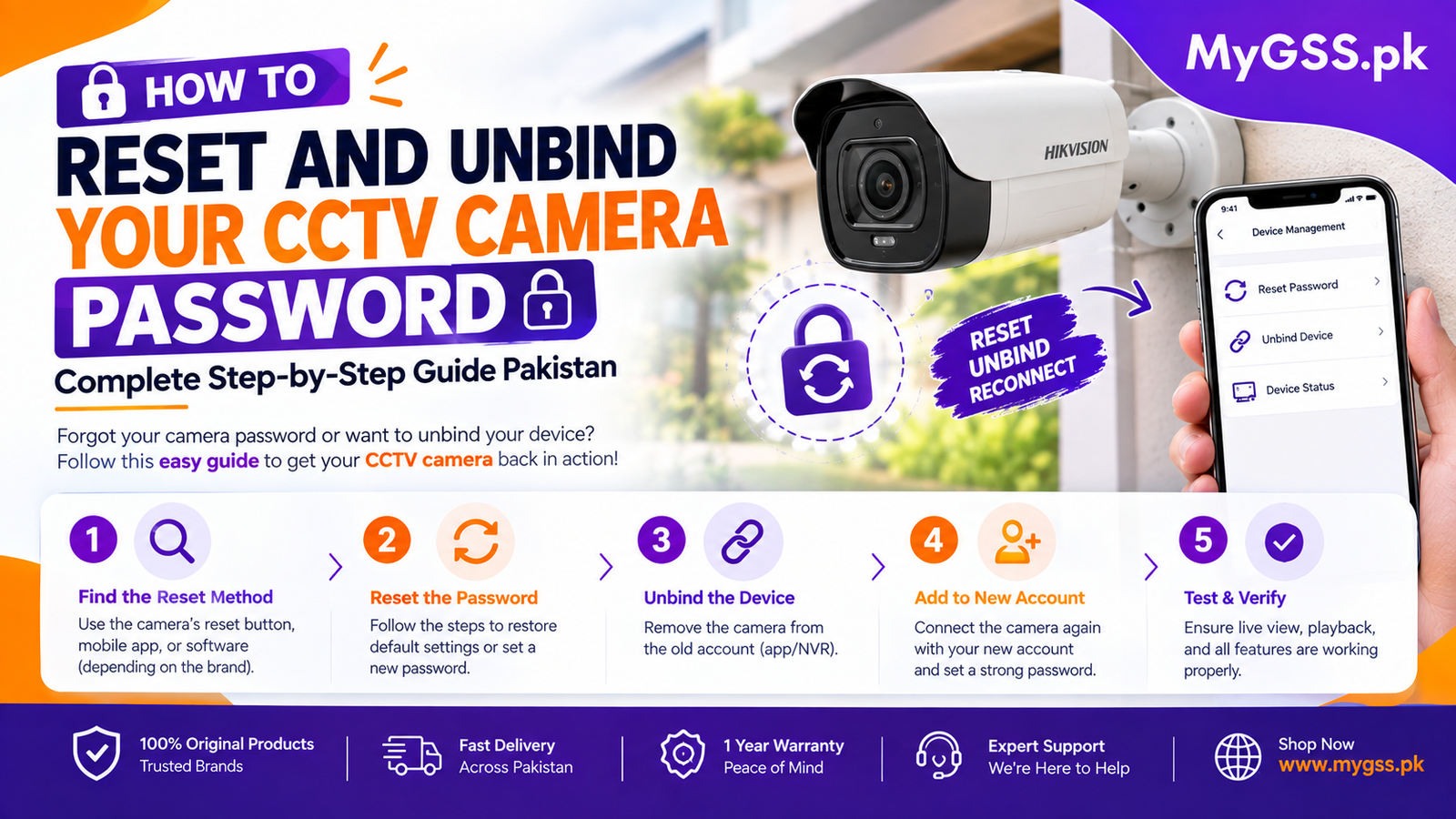
How to Reset Your Password (All Brands)

Every brand follows the same two basic methods — only the app name and reset button timing differ.

Method 1 — Via the app: Open your camera’s app → tap “Forgot Password” on the login screen → enter your registered email or phone number → enter the verification code sent to you → set a new password and log back in. This is always the faster option and keeps your cameras linked to your account.

Method 2 — Physical reset: Power on the camera and let it fully boot → locate the reset pinhole or button on the camera body → press and hold for the duration listed below → release once the LED flashes or you hear a beep/voice prompt → wait for it to reboot → re-add the camera in the app as a new device.

BrandAppPhysical Reset Time
VStarcamVStarcam Ultra10 seconds
IMOUIMOU Life10 seconds
EZVIZEZVIZ App5–10 seconds
DahuaDMSS10 seconds
HikvisionHik-Connect10 seconds
TP-Link TapoTapo App5 seconds
TendaTenda Security8 seconds
V380V380 Pro5–10 seconds

NVR/DVR systems (Dahua, Hikvision): These support an additional browser-based reset — connect your PC to the same network, enter the device’s IP address in a browser, and follow the QR-code verification prompt (DMSS or Hik-Connect app, or Hikvision’s SADP Tool for professional installs). Full configuration walkthroughs for every brand are available if you’d rather follow along visually.

Account Unbinding: Why It Needs an Authorized Reseller

Every brand above ties a device to the account that first registered it. A factory reset alone won’t free a camera from a previous owner’s account — unbinding requires the original owner to remove it, or an authorized dealer to submit an official request through the manufacturer’s reseller channel. This applies to VStarcam, IMOU, EZVIZ, Dahua, Hikvision, TP-Link Tapo, Tenda, and V380 — Hikvision’s Hik-Connect platform is particularly strict about this.

MyGSS.pk holds authorized or official distributor status for all of these brands, so we can submit unbinding requests directly. Contact us on WhatsApp with your camera’s serial number (found on the box or camera body) and proof of purchase if available, and we’ll handle the rest.

Tips to Avoid This Problem Again

  • Save your password in your phone’s notes or a password manager immediately after setup
  • Link cameras to a permanent personal email, not one you might lose access to
  • Enable two-factor authentication where the app supports it
  • Write the password on a sticker inside your DVR/NVR cabinet
  • Buy from authorized sellers only — cameras from unauthorized sources are far more likely to arrive with unresolvable binding issues

Setting Up a Replacement or Additional Camera

If a camera turns out to be permanently unbindable, or you’re simply expanding your system, you can browse our full range of wifi camera and 4G camera options, or complete CCTV kits, on our security cameras category page. For a larger multi-camera setup, our storage calculator can help you plan hard drive capacity before you buy.

If you’d rather have a professional handle setup and configuration entirely, our verified installer directory can connect you with someone local.

Frequently Asked Questions

Why won’t my factory-reset camera connect to my account? A factory reset only clears local settings like WiFi and motion zones — it doesn’t remove cloud account binding. If the camera was previously registered to someone else’s account, you’ll need an official unbinding request, not just a reset.

Can any shop process an account unbind request? No. Unbinding requires going through the manufacturer’s authorized reseller or dealer channel. MyGSS.pk holds this status for VStarcam, IMOU, EZVIZ, Dahua, Hikvision, TP-Link Tapo, Tenda, and V380.

What information do I need to request an unbind? Your camera’s serial number, found on the box or printed on the camera body itself, plus proof of purchase if you have it.

Is a physical reset safe to do myself? Yes, for standalone WiFi cameras it’s straightforward — just be aware it erases all local settings, so you’ll need to reconfigure WiFi and any recording schedules afterward. NVR/DVR systems are slightly more involved and may be worth professional help if you’re not comfortable with network settings.

Need Help?

MyGSS.pk offers free WhatsApp and phone support for every brand we carry, and we’re one of the few stores in Pakistan authorized to process manufacturer unbinding requests directly. Browse genuine security cameras or check current cctv cameras price in pakistan — official brands, transparent pricing, and free tech support included.

Leave a Reply

Shopping Cart (0)

Your bag is empty

Don't miss out on great deals! Start shopping or Sign in to view products added.

Shop What's New Sign in