Your bag is empty
Don't miss out on great deals! Start shopping or Sign in to view products added.
Shop What's New Sign in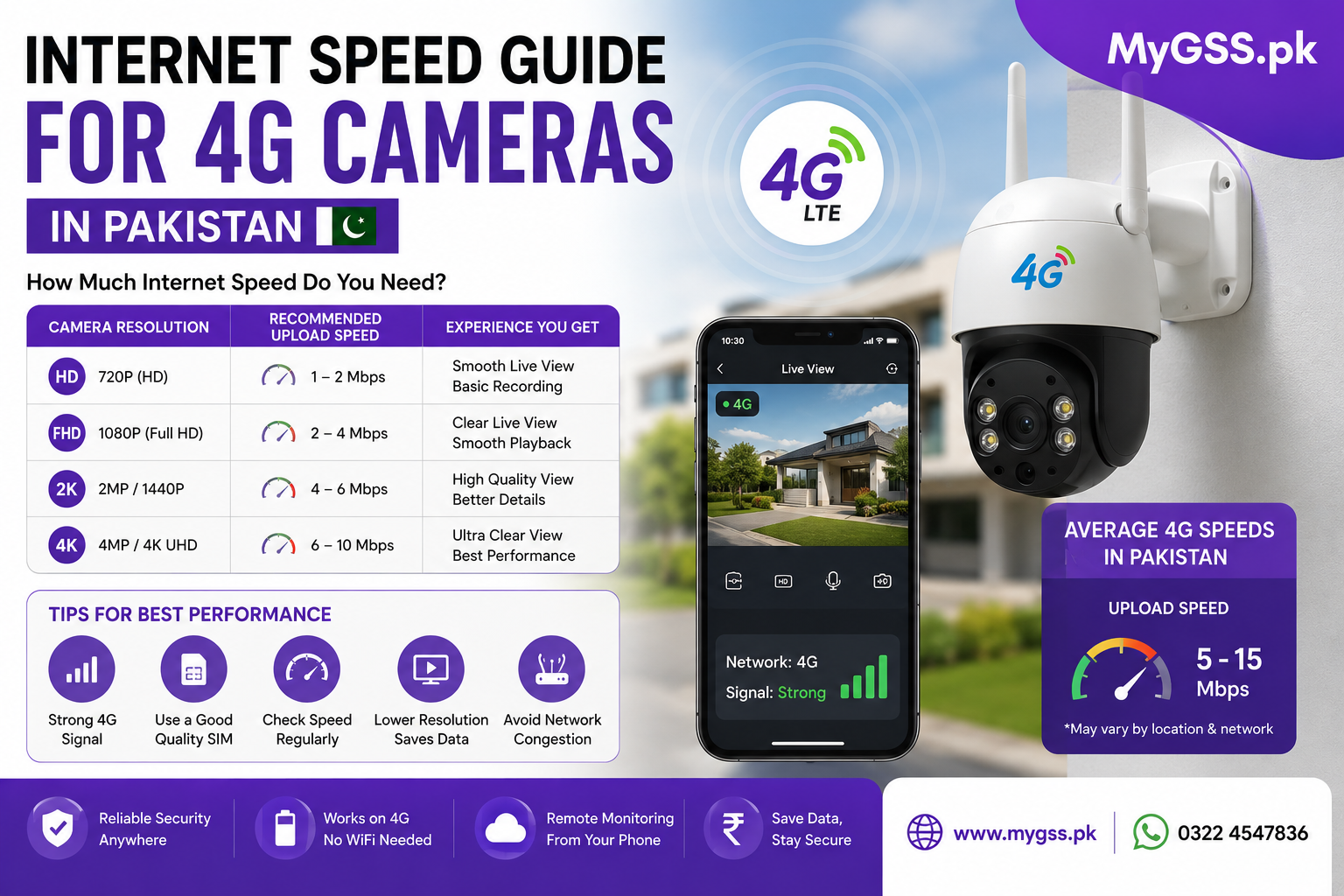
One of the most common questions before buying a 4G camera is whether your SIM’s data speed is actually good enough to run it. It’s a fair concern — nobody wants to invest in a camera only to find the live feed keeps freezing or footage doesn’t upload properly. The good news is that 4G cameras generally need far less bandwidth than most people expect.
This guide breaks down the actual speed requirements, what affects them, and how to check whether your SIM and network coverage are good enough before you buy.
As a general rule:
Most 4G cameras don’t need anywhere close to what’s required for streaming video on a phone or laptop — they’re designed to work efficiently over cellular data specifically, since that’s their whole purpose.
Higher resolution footage takes more bandwidth to stream and upload. A 2MP camera uses noticeably less data than a 5MP or 4K model at the same frame rate, so if your signal is inconsistent, a lower-resolution camera may actually perform more reliably in practice.
Motion-triggered recording uses far less continuous bandwidth than 24/7 continuous recording, since the camera is only actively transmitting or writing footage when it detects movement. If your signal area is marginal, motion-triggered mode is usually the safer setting.
Watching the live feed in real time on your phone uses more bandwidth momentarily than the camera simply recording in the background and uploading periodically. If you mainly want a security record rather than constant live monitoring, your actual bandwidth needs are lower than the numbers above suggest.
If you use two-way audio to talk through the camera, this adds a small additional bandwidth requirement on top of video, though it’s minor compared to the video stream itself.
This is the detail most people miss. A security camera primarily needs good upload speed, since it’s sending video data out to the cloud or to your phone — not downloading data. Many SIM data plans advertise download speed prominently but don’t highlight upload speed separately, so it’s worth checking both if your network operator provides that detail.
If your available speed is below what your camera needs, you’ll typically notice:
In most cases, the camera will still record locally to an SD card even if the network connection is too weak for reliable live streaming — so you won’t necessarily lose footage, just remote access to it in real time.
Not necessarily. A single camera on motion-triggered recording with occasional live viewing typically uses a modest amount of data per month — though continuous 24/7 recording at higher resolutions can add up quickly. If you’re unsure, start with a mid-tier data package and monitor your actual usage in the first month before committing to a larger plan.
What is the minimum internet speed for a 4G security camera? Around 1–2 Mbps is generally enough for basic live viewing and motion-triggered recording. For continuous recording or higher resolutions, 5 Mbps or more is recommended for smoother performance.
Does a 4G camera need good upload speed or download speed? Upload speed matters more, since the camera is sending video data out rather than receiving it. Many SIM plans advertise download speed prominently, so it’s worth checking upload speed specifically before buying.
Will my 4G camera still record if my signal is weak? Usually yes. Most 4G cameras continue recording locally to an SD card even when the network connection is too weak for reliable live streaming, so you may lose real-time remote access without losing the footage itself.
Which network has the best 4G coverage for a camera in rural Pakistan? This varies significantly by specific location rather than by operator nationally. It’s worth checking coverage maps for Jazz, Zong, Telenor, and Ufone for your exact installation area, or testing a few SIMs directly at the site if possible.
Does resolution affect how much internet speed a camera needs? Yes. Higher-resolution cameras (4MP, 5MP, and above) require more bandwidth to stream and upload smoothly than lower-resolution models. In weak-signal areas, a lower-resolution camera can sometimes perform more reliably than a higher-resolution one.
If you’re not sure whether your area’s signal is strong enough for a 4G camera, our team offers free WhatsApp and phone support to help you figure out the right setup before you buy. You can also browse current wifi camera and cctv camera for home options — including solar-powered 4G models — on our security cameras category page, or check the latest cctv cameras price in pakistan.