Your bag is empty
Don't miss out on great deals! Start shopping or Sign in to view products added.
Shop What's New Sign in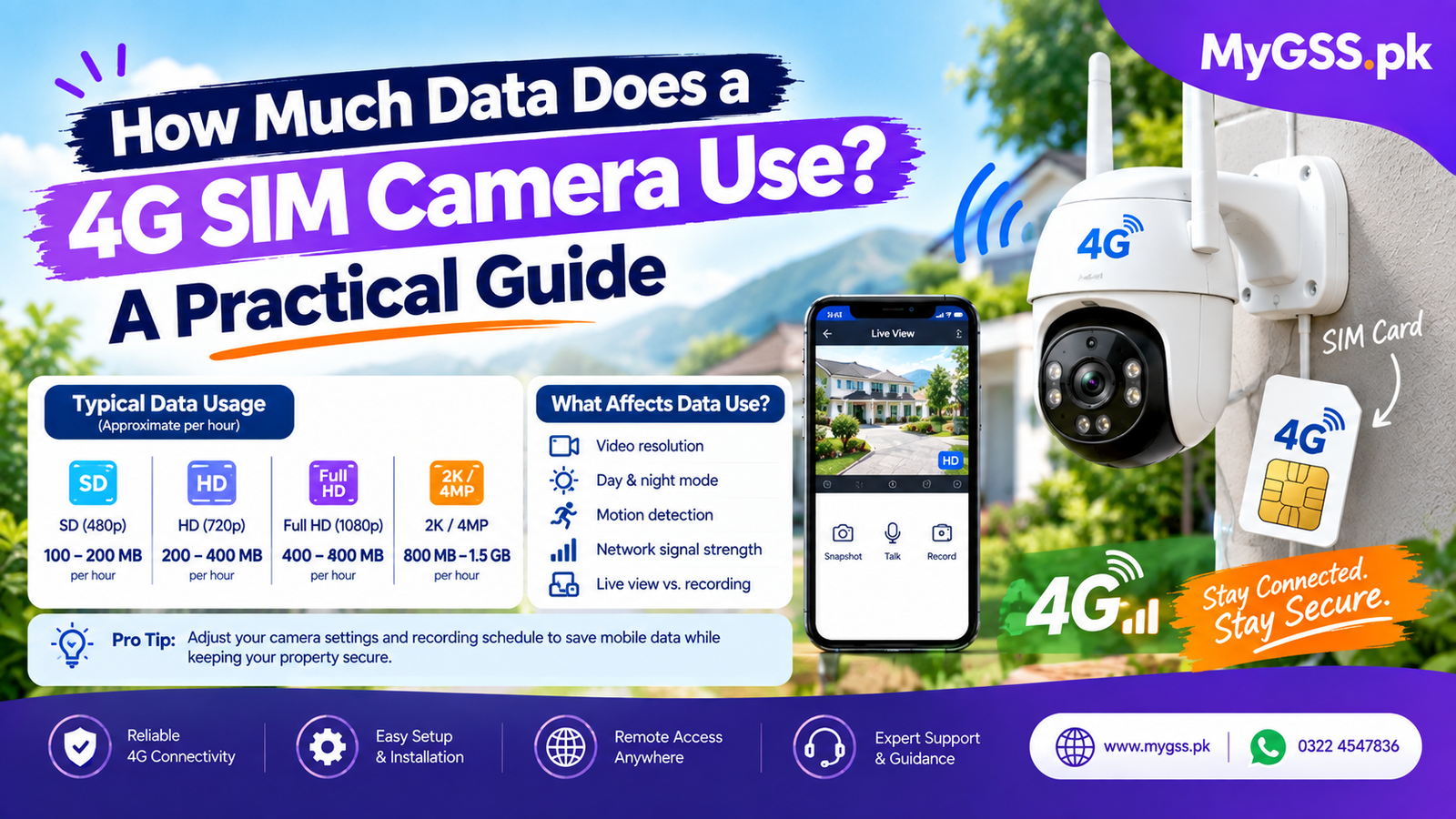
Before buying a 4G camera, one of the most practical questions to answer is how much mobile data it’s actually going to use. Nobody wants to end up with a huge, unexpected data bill a month in — but the good news is that data usage for a 4G security camera is fairly predictable once you understand what actually drives it.
This guide breaks down what affects data consumption, rough usage ranges to plan around, and practical ways to keep your data usage under control.
This is the single biggest factor. A camera recording continuously (24/7) uploads or stores data constantly, using significantly more data than one set to motion-triggered recording, which only activates when it detects movement. For most home and business use, motion-triggered recording covers your actual security needs while using a fraction of the data continuous recording requires.
Higher resolution footage is more data-intensive. A camera set to a lower resolution (like 2MP/1080p) uses noticeably less data than the same camera set to a higher resolution (like 4MP or 5MP) recording the same activity. Many cameras let you choose between a high-quality and a data-saving stream setting — worth checking in your camera’s app.
Newer cameras using H.265 compression can reduce data usage by roughly 30-50% compared to older H.264 cameras at the same resolution and quality, since H.265 compresses video more efficiently. If data usage is a real concern, checking which compression standard a camera supports is worth doing before you buy.
Checking your camera’s live feed through the app uses data in that moment, separate from whatever the camera is recording in the background. Frequent live viewing throughout the day adds up faster than simply letting the camera record and only checking in occasionally or when you get a motion alert.
Talking through the camera adds a small amount of additional data on top of video, though it’s minor compared to the video stream itself unless you’re using it very frequently.
These are general planning estimates — actual usage varies by camera model, settings, and how much activity triggers recording:
Given how much continuous recording adds up, most 4G camera users in Pakistan run motion-triggered recording specifically to keep monthly data usage manageable — full continuous recording over a cellular connection tends to require a genuinely large data allowance to sustain.
Rather than relying purely on general estimates, the most reliable approach is:
This gives you a real number based on your specific camera, location, and activity levels, rather than a generic estimate that may not match your situation.
Once you have a rough estimate of your camera’s usage, it’s worth choosing a SIM data plan with some headroom above your calculated need, rather than the exact minimum — motion-triggered recording usage can spike on higher-activity days (visitors, deliveries, pets moving around) compared to a quiet day. It’s also worth checking whether your camera is PTA approved, since some 4G camera models require separate registration through PTA’s DIRBS system with your CNIC and the device’s IMEI before a local SIM will function properly with it.
Does a 4G camera use a lot of mobile data? It depends heavily on the recording mode. Motion-triggered recording uses a manageable amount of data for most households, while continuous 24/7 recording can use significantly more — often several GB per day or more, depending on resolution.
Is motion-triggered recording enough for home security? For most home and small business use, yes. It captures the activity that actually matters — people, vehicles, movement — without the data (and storage) cost of recording constant empty footage.
How can I check how much data my 4G camera is actually using? Check your SIM’s data usage through your mobile carrier’s app or a USSD balance-check code after a few days of typical use, then extrapolate to estimate your monthly usage based on that sample period.
Does higher resolution always mean more data usage? Generally yes, since more detailed footage requires more data to transmit and store. If data usage is a priority, consider using a slightly lower resolution setting, especially for continuous recording.
Do I need an unlimited data plan for a 4G security camera? Not necessarily. A single camera on motion-triggered recording with moderate activity often fits comfortably within a standard mid-tier data plan. Continuous recording, especially at higher resolutions, is where an unlimited or very large plan becomes genuinely necessary.
You can explore our full range of wifi camera and 4G cctv camera for home options, along with current cctv cameras price in pakistan, on the cctv camera section of our site. Not sure which recording settings or data plan fit your property? Our team offers free WhatsApp and phone support to help you plan the right setup before you buy.